tf-drift
Terraform Config Selection
Problem and Goal
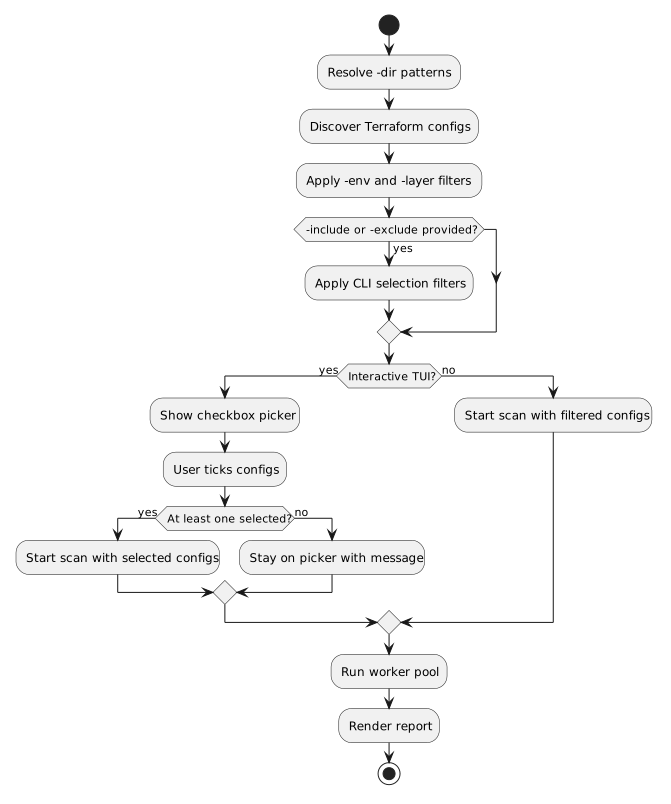
tf-drift scans every discovered Terraform layer after -dir, -env, and -layer filtering. Users need one more narrowing step: interactive users should be able to tick the detected configs they want to check, and CI users should be able to include or exclude configs with flags.
Scope
Add selection in two surfaces:
- Interactive TUI: show a pre-scan checkbox list of detected configs.
- Non-interactive CLI: add
-includeand-excludeflags for comma-separated suffix or glob patterns.
Selection applies before the worker pool starts. The existing scanning, reporting, exit-code, and detail-inspector behavior stays unchanged once the selected list is built.
Workflow
The diagram shows selection as a shared step between discovery and scanning.
Interaction Contract
The interactive picker defaults every discovered config to selected. Keyboard controls:
space: tick or untick the current config.a: select all configs.n: select none.enter: start scanning selected configs.qorctrl+c: quit without scanning.
If the user presses enter with no configs selected, the picker stays open and shows Select at least one config.
CLI Contract
-include and -exclude accept comma-separated patterns. Patterns match config base names, relative suffixes, and slash-separated path suffixes. Include runs first, then exclude.
Examples:
tf-drift -dir examples -non-interactive -include "clean-empty,drift-*"
tf-drift -dir examples -non-interactive -exclude "error-*"
Acceptance Criteria
- TUI mode shows a checkbox picker before scanning starts.
- TUI users can tick/untick, select all, select none, quit, and start scanning.
- TUI users cannot start a scan with zero selected configs.
- Non-interactive mode supports
-includeand-exclude. - Include and exclude filters preserve layer order.
- The worker pool only receives selected layers.
- README documents the new controls and flags.
Test Plan
- Unit test include/exclude matching and ordering.
- Unit test picker key behavior for tick, all, none, enter, and empty selection.
- Run
go test ./...,go vet ./..., andmake build. - Run examples with
-includeand-excludeto verify selected statuses.